Recipe 03: AI content summarizer
Goal: POST an article URL to a webhook. Flero fetches the page, summarises it with an AI model, and emails you the result.
Difficulty: Beginner · Time: about 15 minutes · Connectors: an AI provider (Anthropic, OpenAI or Google), Email
Prerequisites
- An AI provider credential, for example an Anthropic or OpenAI API key.
- A way to send email: the platform mail server your admin set up under Settings → Notifications → SMTP for Workflow Emails, or your own SMTP details.
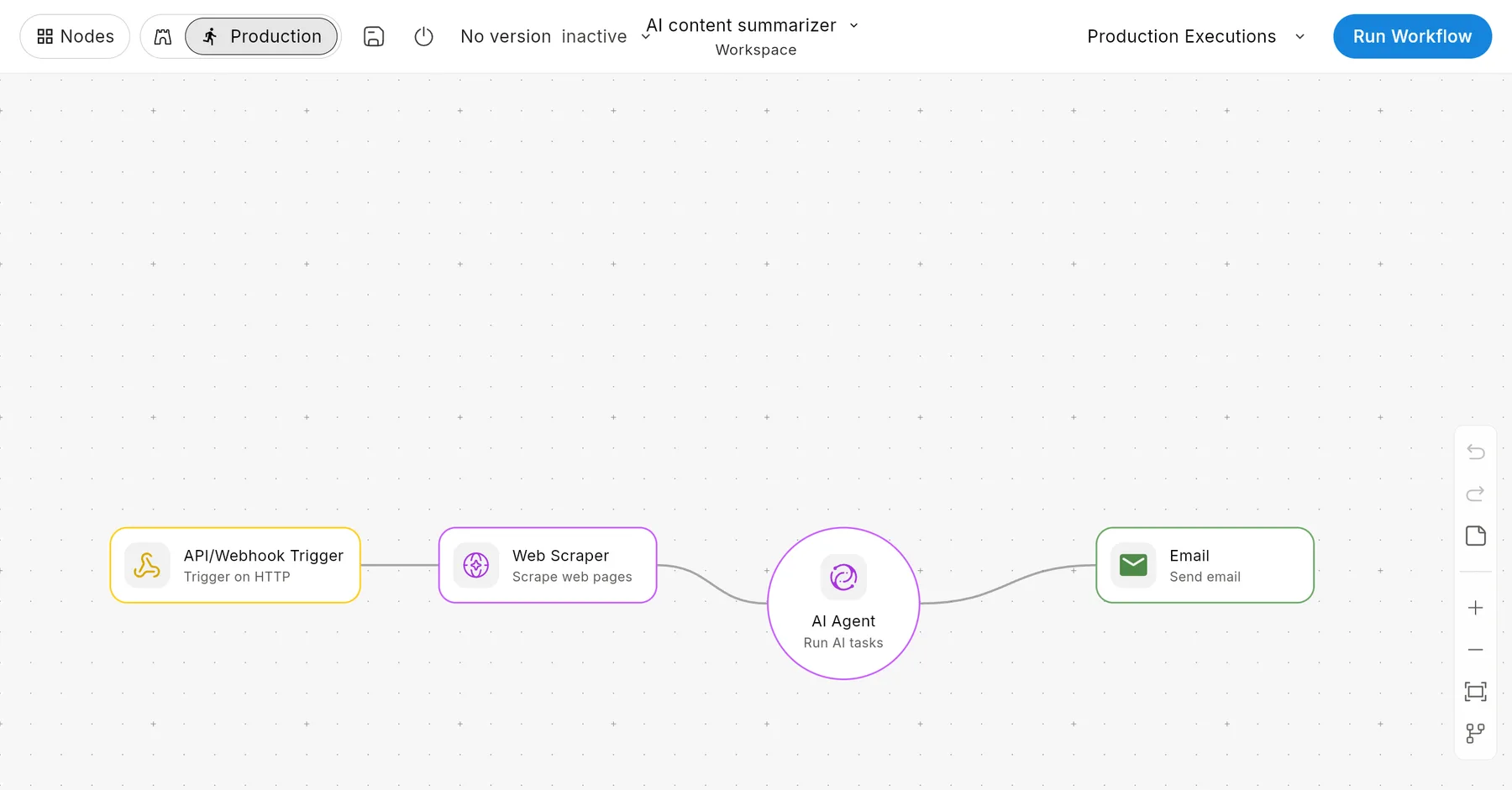
Finished workflow
Step-by-step
1. Webhook trigger
Add an API/Webhook Trigger with HTTP Method POST and a distinct Webhook Path, such as /demo/summarise. The body will look like { "url": "https://..." }.
2. Web Scraper
Add a Web Scraper node:
- URL:
{{ $trigger.payload.url }} - Mode:
text - Max chars:
12000(the default). This keeps long pages within the model's limits.
In text mode the node returns the page title and its readable content.
3. AI Agent
Add an AI Agent node:
- Provider: Anthropic, OpenAI or Google
- Credential: your AI credential
- Model: pick one from the list
- System instructions:
You are a concise editor. Given an article, write a 3-sentence summary and 3 key takeaways as a bulleted list. Do not add facts that are not in the article. - Prompt:
Title: {{ $node["Web Scraper"].output.title }} Article: {{ $node["Web Scraper"].output.content }} - Temperature:
0.3, for steadier summaries
The answer is in {{ $node["AI Agent"].output.content }}.
4. Send the email
Add an Email node:
- Operation: Send
- Mail service: Platform, or Custom with your SMTP details
- To: your email address
- Subject:
Summary: {{ $node["Web Scraper"].output.title }} - Body:
Source: {{ $trigger.payload.url }}

{{ $node["AI Agent"].output.content }}
5. Save and activate
Save, then set the workflow to Active in the editor toolbar's version menu.
Try it
curl -X POST <your webhook URL> \
  -H "Content-Type: application/json" \
  -d '{"url": "https://en.wikipedia.org/wiki/Workflow"}'
Within a minute you should receive an email with the summary. The run's AI cost shows in Logs.
Variations
Send the address in the request
Use {{ $trigger.payload.recipient }} as To, and include "recipient" in the request body.
Several URLs at once
Send { "urls": ["...", "..."] } and add a Loop over {{ $trigger.payload.urls }}. Inside the loop, the current URL is {{ $input.item }}.
Check the output
Add an AI Guardrails node after the AI Agent with operation pii_detection, so personal data is caught before the email goes out. It routes each item to passed or failed.
Cap the cost
Add a Token/Cost Guard node before the AI Agent, and set a workspace AI budget.
Troubleshooting
| Symptom | Likely cause | Fix |
|---|---|---|
Web Scraper returns little or no content |
The page builds its text with JavaScript | Try markdown mode, or use the Web Controller node, which drives a real browser |
| Summary is cut short | The model hit its output limit | Check the AI Agent output's truncated field. Raise Max tokens or ask for a shorter summary. |
| Email never arrives | No platform mail server is set up, or the mail went to spam | Ask your admin to set up SMTP for workflow emails, or use Custom SMTP |
[EXPR-ERROR: Node "Web Scraper" not found …] |
The node was renamed | Use the node's exact name in expressions |
| AI Agent fails with "budget exceeded" | The workspace hit its monthly AI limit | See AI budgets |
Next
Found something out of date? This page lives in the Flero docs content set.